Full-Stack AI Game Asset
Generator
The original version established a fully local AI pipeline using Flux and ComfyUI for rapid, cost-free sprite generation. This version builds on that foundation — introducing a redesigned UI, Azure AI Foundry integration, DALL-E 3 cloud generation, RAG-powered prompt augmentation, and enterprise-grade content guardrails.
What Is GameForge AI?
GameForge AI connects three image generation backends under one interface designed specifically for game developers. Describe what you want — a warrior, a potion, a medieval building — pick a style and background, and the app assembles a precise prompt and sends it to one or more AI models simultaneously.
Results are saved to a local IndexedDB library, organized by project, and ready to drop into your game engine. No external database required — everything persists in the browser across sessions.
- Multi-model parallel generation powered by Azure DALL-E 3
- 10 style presets (pixel art, anime RPG, dark fantasy, and more)
- Built-in background removal and animation frame extractor
- Project-based asset organization with IndexedDB
- Reference image upload for guided generation
System Overview
The app is split across three layers: a Next.js frontend for the UI, a Next.js API route that orchestrates generation requests, and a standalone Python/Flask project that proxies Azure OpenAI calls server-side.
1. Next.js Frontend
App Router + TypeScript + Tailwind CSS v4. Handles all UI, form state, IndexedDB reads/writes, and displays results as they arrive.
2. Next.js API Route
/api/ai-assets/2d orchestrates generation — forwarding requests to the Flask backend and returning results to the client using Promise.allSettled for resilient parallel dispatch.
3. Python / Flask Backend
A standalone Flask project running on port 5051 — kept in a separate directory from the Next.js app. Acts as a secure proxy for Azure OpenAI (DALL-E 3), keeping API credentials server-side and off the client.
┌──────────────────────────────────────────────┐
│              Next.js Frontend                │
│     (App Router · TypeScript · Tailwind)     │
│                                              │
│  /ai-assets  →  2D Generation + Gallery      │
│  /animation  →  Frame Extractor + Library    │
│  /bg-remove  →  Background Removal Tool      │
└───────────────┬──────────────────────────────┘
                │  /api/ai-assets/2d
                │  Promise.allSettled()
          ┌─────▼──────────────────────┐
          │  Python / Flask            │
          │  Standalone project        │
          │  Port 5051                 │
          │                            │
          │  Azure AI Foundry          │
          │  DALL-E 3 via Azure OpenAI │
└────────────────────────────┘DALL-E 3 via Azure AI Foundry
DALL-E 3 was chosen as the generation model for this version — deployed through Azure AI Foundry and accessed via the Azure Python SDK. It produces stronger prompt adherence and visual coherence than earlier models, which matters when descriptions include specific style, direction, and background constraints.
The model is never called from the Next.js frontend directly. A standalone Flask project acts as a secure proxy — Azure credentials stay server-side and never reach the browser.
openai SDK pointed at an Azure endpoint — same interface as the OpenAI SDK, Azure-hosted and enterprise-governed 1from openai import AzureOpenAI
2import os
3
4# Azure AI Foundry endpoint + credentials
5client = AzureOpenAI(
6 api_key=os.getenv("AZURE_OPENAI_KEY"),
7 api_version="2024-02-01",
8 azure_endpoint=os.getenv("AZURE_OPENAI_ENDPOINT")
9)
10
11# Generate image via DALL-E 3
12response = client.images.generate(
13 model="dall-e-3",
14 prompt=assembled_prompt,
15 size="1024x1024",
16 quality="standard",
17 n=1
18)
19
20image_url = response.data[0].url1// Next.js API route forwards to standalone Flask project
2const res = await fetch(`${FLASK_URL}/generate`, {
3 method: 'POST',
4 headers: { 'Content-Type': 'application/json' },
5 body: JSON.stringify({ prompt: assembledPrompt })
6});
7
8const { image_url, error } = await res.json();Automated Prompt Assembly
Crafting effective AI prompts is a skill most game developers shouldn't need to learn. GameForge AI abstracts it entirely — structured UI selectors are encoded into curated prompt templates and assembled automatically before any model is called.
The Assembly Formula
Every generation request combines three inputs into a single optimized prompt. The user only writes the description — the style and background suffixes are injected automatically based on their selector choices. This ensures the prompt is rich, precise, and tailored for the chosen game art style.
Style Presets
Each preset injects a curated suffix — essentially a prompt template encoded in the app — that steers the model toward a specific visual aesthetic. These suffixes are the result of iterative prompt testing across multiple models and styles.
| Style | What it produces |
|---|---|
| 16-bit Pixel Art | SNES/Mega Drive sprite style, limited palette, sharp pixels |
| 8-bit Pixel Art | NES/GameBoy style, chunky pixels, retro arcade look |
| Cartoon | Bold outlines, vibrant flat colors, mobile/indie look |
| Anime RPG | JRPG character art inspired by Final Fantasy / Chrono Trigger |
| Chibi | Cute, super-deformed proportions for mobile RPGs |
| Dark Fantasy | Gritty, detailed, Diablo-style illustration |
| Hand-Painted | Painterly brushstrokes — Hollow Knight aesthetic |
| Flat / Vector | Clean geometric shapes, modern indie look |
| Isometric 2.5D | Top-down view for strategy and RPG tiles |
| Watercolor | Soft blended colors, dreamy atmosphere |
Background Control
AI image models cannot natively output transparent PNGs — they always render a background. The background selector injects a flat solid color instruction into the prompt so the result is easy to remove later using the built-in BG Remover. The color choice depends on the sprite's edge characteristics.
| Option | Injected instruction | Best for |
|---|---|---|
| White | solid white fill | Easiest auto-remove |
| Black | solid black fill | Sprites with glow effects |
| Green Screen | pure #00FF00 fill | Animation / chroma key |
| Custom Hex | user-defined color | Match game scene tone |
Generate with a solid background → open BG Remover → pick the image from your project → download the transparent PNG ready for your game engine.
Multi-Model Generation
The same engineered prompt is dispatched to every selected model simultaneously. Because the prompt is fully assembled before dispatch, each model receives identical input — meaning you're comparing models, not comparing prompt quality.
Assets automatically match the intended style and background — no prompt drift between sessions.
Developers focus on what they want to create, not on learning AI prompting techniques.
Multiple models queried in parallel from a single input — no repeated prompt entry per model.
Prompts are designed to work with downstream tools — BG Remover and animation extraction are built around the same background conventions.
Retrieval-Augmented Generation
Static style suffixes get you far — but they don't encode game engine constraints. To bridge that gap, a RAG layer was integrated using Azure AI Search. Before an image is generated, the system retrieves relevant game art guidance documents and injects them into the prompt as contextual constraints.
This transforms the system from static prompt engineering to context-aware prompt augmentation — ensuring outputs align with real-world game development rules like sprite color limits, isometric grid ratios, and consistent sprite framing.
User Prompt
  ↓
Generate Embedding
  ↓
Azure AI Search
  ↓  Hybrid: Vector + Keyword
Retrieve Top Style / Constraint Docs
  ↓  "top-down medieval building"
       → isometric rules, tile grid,
         color depth constraints
Augment Prompt with Context
  ↓
Send to DALL·E 3Captures semantic intent — "medieval strategy building" retrieves isometric and top-down constraint docs even without exact keyword matches.
Narrows results to the relevant style category — ensures retrieved docs are scoped to the selected preset rather than returning unrelated constraints.
Azure AI Search was chosen because it mirrors how production retrieval systems are built at enterprise scale — supporting the same capabilities used in real-world RAG deployments.
| Static Prompting | With RAG | |
|---|---|---|
| Style guidance | Fixed suffix per preset | Retrieved + context-matched |
| Engine constraints | Not encoded | Injected per style/asset type |
| Semantic matching | Keyword-only | Vector + keyword hybrid |
| Extensibility | Edit code to add rules | Add docs to search index |
| Architecture pattern | App-level templates | Production RAG pipeline |
GameForge AI produces assets that are not only visually coherent but technically aligned with game development standards — and demonstrates how generative AI systems can be structured with modular retrieval layers for accuracy, control, and scalability.
AI Governance + Guardrails
Implementing AI guardrails for game asset generation requires nuance. Games include combat, monsters, and dark fantasy — overly aggressive filtering breaks legitimate use cases. The solution is a layered defense-in-depth model tuned specifically for a game development context.
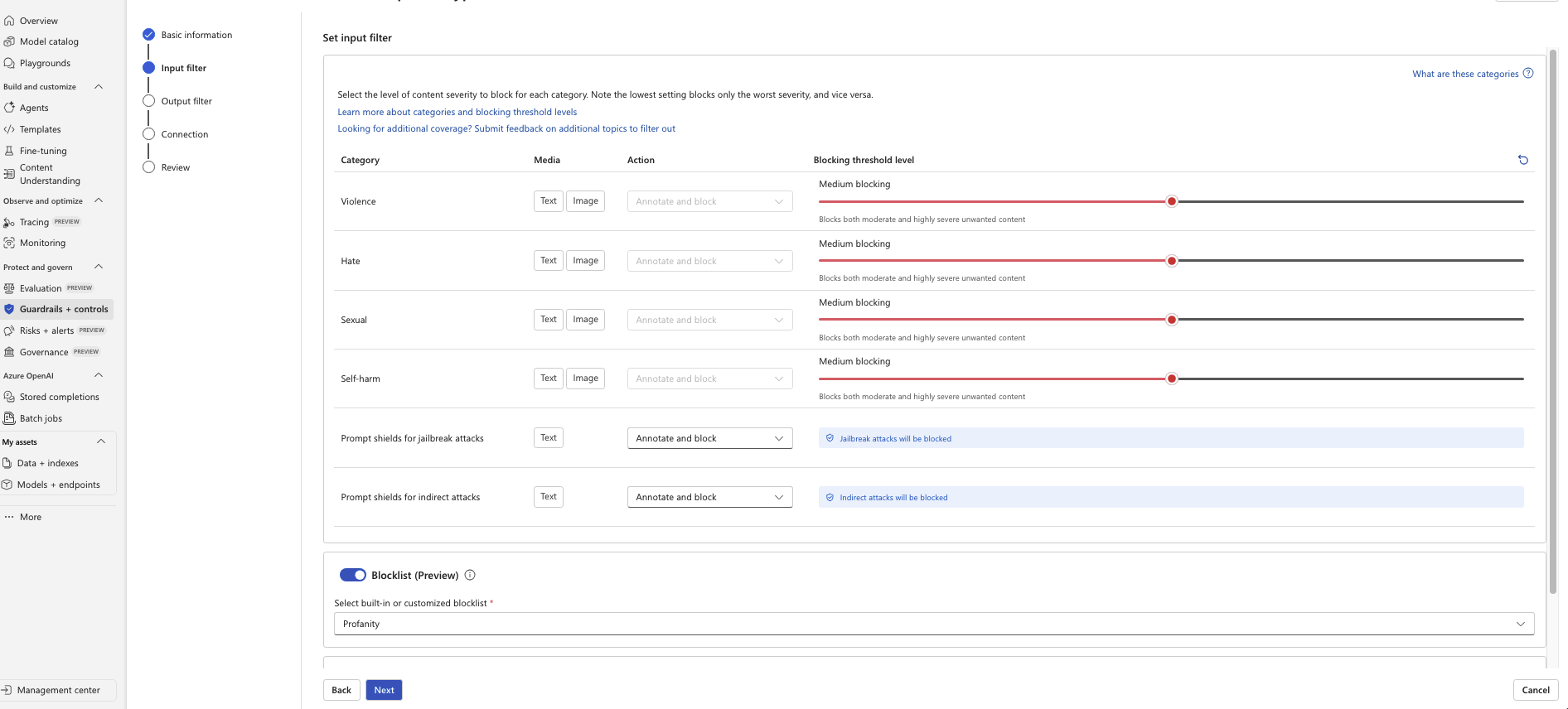
Layered Protection Architecture
Content filtering alone is not sufficient for production AI systems. Every generation request passes through multiple validation layers before a model is ever invoked — reducing cost exposure from rejected prompts and preventing misuse at the earliest possible point.
User Input
  ↓
Server-Side Validation (Flask)
  ↓  Banned keywords rejected before API call
Azure Content Filter
  ↓  Violence / Hate / Sexual / Self-Harm
Prompt Shield
  ↓  Jailbreak + indirect attack detection
Custom Blocklist
  ↓  Domain-specific restricted terms
Image Generation (DALL-E 3)
  ↓
Output Moderation Review
  ↓
Response to UserThresholds Tuned for Game Dev
Rather than maximum blocking across all categories, thresholds were intentionally calibrated for a game development context — preserving creative flexibility while maintaining responsible governance.
| Category | Level | Rationale |
|---|---|---|
| Violence | Medium | Allows "warrior with sword" RPG prompts; blocks graphic gore |
| Hate | Medium | Blocks racist content and extremist symbolism — no creative use case |
| Sexual | Medium | Allows stylized game characters; blocks explicit adult content |
| Self-Harm | Medium | No valid game asset use case — restricted without affecting gameplay prompts |
Prompt Shield Protections
Azure Prompt Shields were enabled to mitigate jailbreak attempts and indirect prompt injection attacks.
Custom Blocklist
Beyond platform defaults, a custom blocklist enforces domain-specific restrictions, keeping the environment appropriate for professional presentation.
Audit Logging
Generation events are structured for enterprise compliance tracking, abuse detection, and cost governance.
Pre-validation Before API Call
The Flask backend validates prompts before invoking the Azure OpenAI API. This rejects clearly disallowed prompts at zero cost, reducing unnecessary API calls and preventing model invocation for flagged content.
Returning a 400 immediately — before any API call — also protects against cost abuse in a multi-user environment.
 1# Server-side pre-validation before invoking Azure OpenAI
 2banned_keywords = [
 3    "porn", "explicit", "nude", "slur"
 4]
 5
 6def validate_prompt(prompt: str):
 7    if any(word in prompt.lower()
 8           for word in banned_keywords):
 9        return {
10            "error": "Prompt violates content policy"
11        }, 400
12    return None
13
14@app.route('/generate', methods=['POST'])
15def generate():
16    prompt = request.json.get('prompt', '')
17    err = validate_prompt(prompt)
18    if err:
19        return jsonify(err[0]), err[1]
20
21    # Safe to proceed — invoke Azure OpenAI DALL-E 3
22    response = client.images.generate(
23        model="dall-e-3",
24        prompt=prompt,
25        size="1024x1024"
26 )When a Knight Gets Blocked
This error occurred during development and is exactly why filter threshold tuning matters. A completely legitimate game asset prompt — a knight sprite — was blocked because the word "sword" triggered a violence: low severity flag. With the default maximum blocking level, this would silently fail every RPG or action game prompt. Understanding your audience and use case is what makes the difference between a usable AI system and one that blocks its own purpose.
[DALL-E] deployment='dall-e-3'
         size=1024x1024
         prompt='Knight with a red cape, side profile
                 view facing right, 2D game sprite,
                 green screen background, no shadows'

[DALL-E] API status error:
  status=400
  code='content_policy_violation'
  inner_code='ResponsibleAIPolicyViolation'

  content_filter_results:
    hate:      filtered=False   severity='safe'
    self_harm: filtered=False   severity='safe'
    sexual:    filtered=False   severity='safe'
    violence:  filtered=True    severity='low'  ← blocked

  message: 'This request has been blocked by our
            content filters.'
The word "sword" (implied by "knight" context) caused a violence: low severity flag. At maximum blocking, even low severity violations are rejected — meaning a standard knight sprite prompt fails entirely.
"A 2D game sprite of a medieval knight wearing armor with a vibrant red cape against a green screen background. The knight is portrayed from a side profile view facing right, standing tall, holding a sword at their side, with simple yet sharp pixel art design..."
Azure suggested an auto-revised prompt that passed — but the request was still blocked at the time due to the filter level.
Setting Violence to Medium in Azure AI Foundry allows low severity content to pass while still blocking moderate and high severity. A knight with a sword — a staple of virtually every RPG ever made — generates successfully.
Three Tools, One Workflow
2D Asset Generator
The core tool. Enter a description, pick a style, direction, and background, optionally upload a reference image, assign a project — then hit Generate. Results auto-save to IndexedDB and appear in the gallery. You can assign or reassign projects from any gallery card without leaving the page.
Animation Frame Extractor
Upload a video file (MP4, WebM, MOV up to 50MB), trim to a frame range, set the extraction FPS, and optionally run background removal on every frame. The result is a sprite sheet you can drop directly into your game engine. Videos and sheets are saved to your library for future sessions.
1Upload video (MP4 / WebM / MOV, max 50MB)
2  → Set trim range  (start / end seconds)
3  → Set extraction FPS
4  → Optional: remove BG from every frame
5  → Pack into sprite sheet (PNG grid)
6  → Save to IndexedDB library
7 → Download / assign to projectBackground Remover
Upload a local image or pick any saved image directly from your projects. Adjust the color threshold to control how aggressively the background is removed. Produces a transparent PNG ready for your game engine.
IndexedDB — No Backend Needed
All assets, videos, and project metadata are stored directly in the browser using IndexedDB via a custom lib/assetStore.ts wrapper. There is no external database — everything persists across sessions locally on your machine.
Projects act as folders for organizing your generated assets. You can assign or reassign any image to a project at any time from the gallery card without leaving the page.
Stored as base64 data URLs with prompt metadata, model used, style, and project assignment.
Uploaded videos and extracted sprite sheets saved for reloading in future sessions — no re-upload needed.
Named project groups for organizing assets by game, character, or content type. Assign assets from the gallery card.
Technical Highlights
Promise.allSettled — one model failure never blocks othersChallenges Solved
Conclusion
GameForge AI started as a personal tool for generating consistent 2D game assets and grew into a full-stack platform with three integrated tools, two AI backends, and a zero-database client-side persistence layer.
The prompt engineering system removes the hardest part of AI image generation for game developers — writing effective prompts. The parallel multi-model architecture means you always get the best result available, whether you're running local hardware or using cloud APIs.
More broadly, this project demonstrates how to integrate multiple AI backends into a single cohesive product — handling partial failures gracefully, keeping credentials secure, and building a UX that feels fast even when generation takes time.